
11.1 Getting Started
On and Off
Press ON to turn on the calculator (see Figurea). You will see a cursor blinking in the upper left corner of the Home screen. Press 2ndON to turn off the calculator.
Numbers and Operations
The parentheses keys, the Clear key, and the Enter key are shown in Figurea. Locate the number keys, operation keys, and arrow keys on your calculator, as shown in Figureb.
We use the minus key for subtraction, but we use the (-) key (located next to ENTER) for negative numbers.
We press ENTER to tell the calculator to compute.
The calculator has a key for the value of .
Clear and Delete
Press DEL to delete the character under the cursor.
Press CLEAR to clear the contents of the current input line.
In the Home screen, press CLEAR CLEAR to clear the entire screen.
Troubleshooting
-
If your screen is too light, press
2ndup arrowseveral times to make it darker. If it is too dark, press2nddown arrow. -
For the features we use in this book, the MODE and FORMAT should be in their default settings. Press
MODEto see the menu in Figure B.2a, and2ndZOOMto see the format menu in Figureb. Use the Arrow keys andENTERto alter the menus to the default settings if necessary. Note: The Set Clock function does not appear on the T1-83.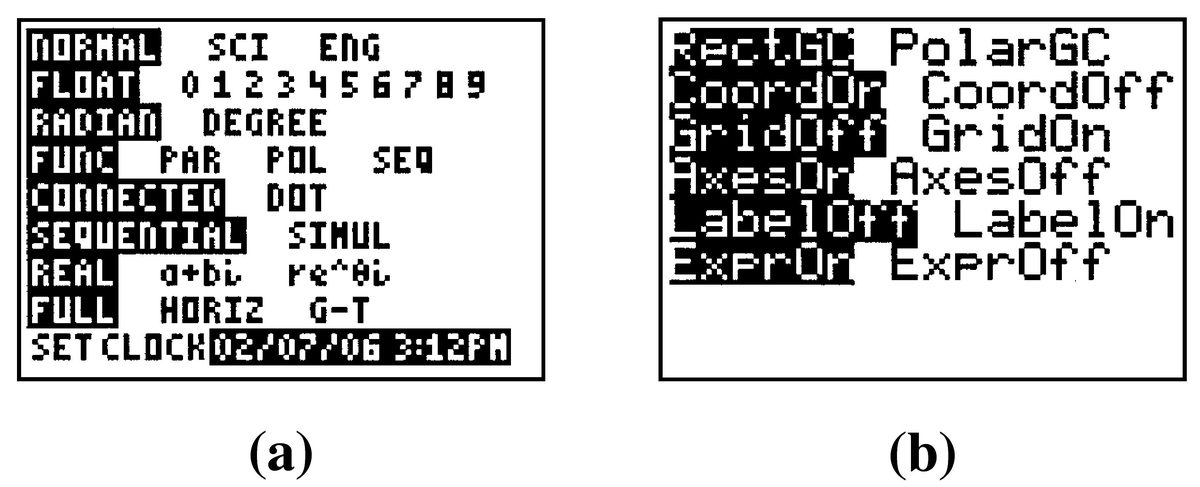
Modeling, Functions, and Graphs by Katherine Yoshiwara (yoshiwarabooks.org), GNU Free Documentation License 1.2 or later. Adapted for the XYZ HTML edition with the authors' permission (recorded 2026-07-04). License: GFDL-1.2-or-later.