
14.3 Files in different locations and working with CSV files
Learning objectives
By the end of this section you should be able to
- Demonstrate how to access files within a file system.
- Demonstrate how to process a CSV file.
Opening a file at any location
When only the filename is used as the argument to the open function, the file must be in the same folder as the Python file that is executing. Ex: For fileobj = open("file1.txt") in files.py to execute successfully, the file1.txt file should be in the same folder as files.py.
Often a programmer needs to open files from folders other than the one in which the Python file exists. A path uniquely identifies a folder location on a computer. The path can be used along with the filename to open a file in any folder location. Ex: To open a file named logfile.log located in /users/turtle/desktop the following can be used:
fileobj = open("/users/turtle/desktop/logfile.log")
| Operating System | File location | open function example |
|---|---|---|
| Mac | /users/student/ | fileobj = open("/users/student/output.txt") |
| Linux | /usr/code/ | fileobj = open("/usr/code/output.txt") |
| Windows | c:\projects\code\ | fileobj = open("c:/projects/code/output.txt")or fileobj = open("c:\\projects\\code\\output.txt") |
Working with CSV files
In Python, files are read from and written to as Unicode by default. Many common file formats use Unicode such as text files (.txt), Python code files (.py), and other code files (.c,.java).
Comma separated value (CSV, .csv) files are often used for storing tabular data. These files store cells of information as Unicode separated by commas. CSV files can be read using methods learned thus far, as seen in the example below.
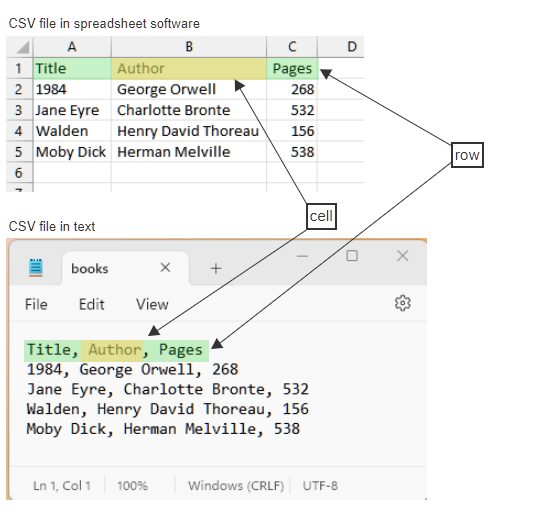
\n characters and cells separated by commas.Raw text of the file:
Title, Author, Pages\n1984, George Orwell, 268\nJane Eyre, Charlotte Bronte, 532\nWalden, Henry David Thoreau, 156\nMoby Dick, Herman Melville, 538