
7.1 Intro to GPUs
GPUs are essential for high-performance computation, but programming them has historically been a highly specialized skill. Mojo represents a chance to rethink GPU programming and make it more approachable. But if you've never programmed a GPU before, you first need to understand how the GPU hardware and execution model is different from a CPU. That's what this page is all about—there's no code here, so if you already understand GPU hardware, you can skip to the Get started tutorial or GPU programming fundamentals.
GPU architecture overview
Graphics Processing Units (GPUs) and Central Processing Units (CPUs) represent fundamentally different approaches to computation. While CPUs feature a few powerful cores optimized for sequential processing and complex decision making, GPUs contain thousands of smaller, simpler cores designed for parallel processing. These simpler cores lack sophisticated features like branch prediction or deep instruction pipelines, but excel at performing the same operation across large datasets simultaneously.
Modern systems take advantage of both CPU and GPU processors' strengths by having the CPU handle primary program flow and complex logic, while offloading parallel computations to the GPU through specialized APIs. Figure 1 illustrates some of the architectural differences between the two, which we'll discuss further below.
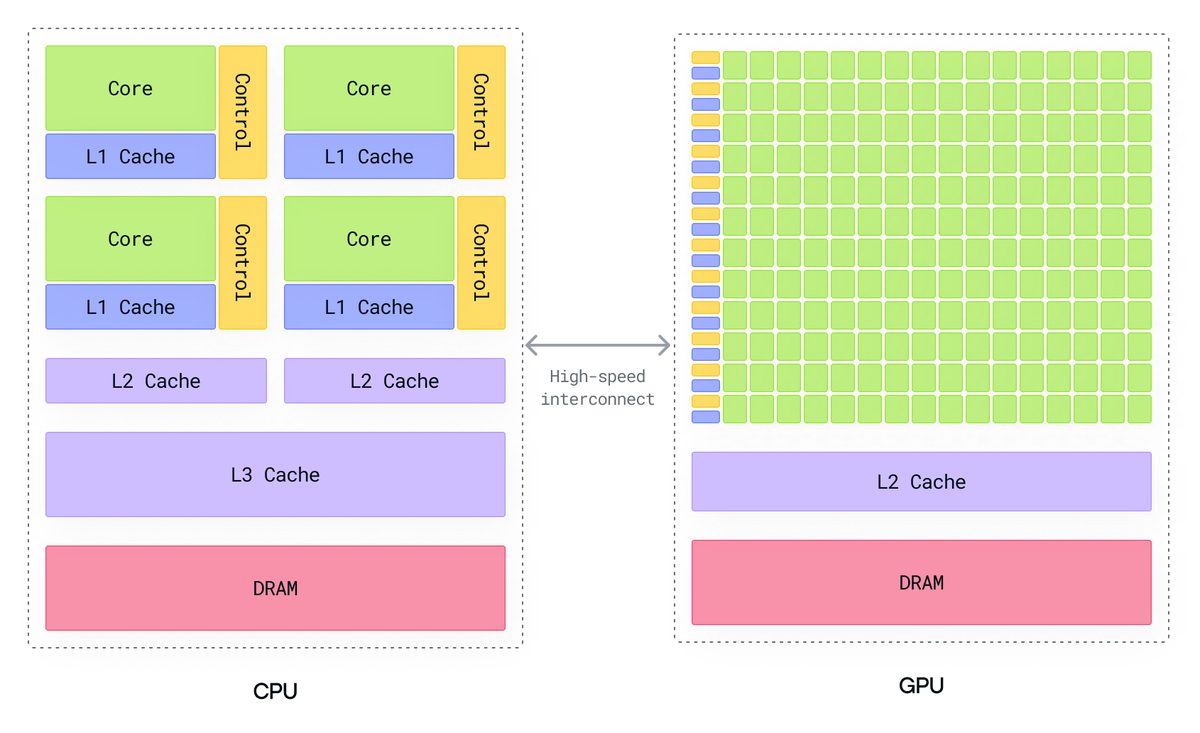
The basic building block of a GPU is called a streaming multiprocessor (SM) on NVIDIA GPUs or a compute unit (CU) on AMD GPUs (they're the same idea and we'll refer to them both as SM). SMs sit between the high-level GPU control logic and the individual execution units, acting as self-contained processing factories that can operate independently and in parallel.
Multiple SMs are arranged on a single GPU chip, with each SM capable of handling multiple workloads simultaneously. The GPU's global scheduler assigns work to individual SMs, while the memory controller manages data flow between the SMs and various memory hierarchies (global memory, L2 cache, etc.).
The number of SMs in a GPU can vary significantly based on the model and intended use case, from a handful in entry-level GPUs to dozens or even hundreds in high-end professional cards. This scalable architecture enables GPUs to maintain excellent performance across different workload sizes and types.
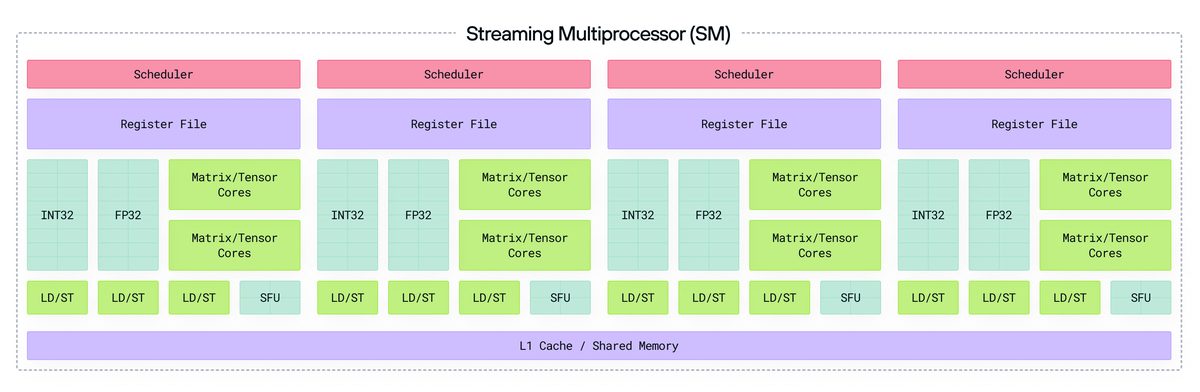
Each SM contains several essential components:
- CUDA Cores (NVIDIA)/Stream Processors (AMD): These are the basic arithmetic logic units (ALUs) that perform integer and floating-point calculations. A single SM can contain dozens or hundreds of these cores.
- Tensor Cores (NVIDIA)/Matrix Cores (AMD): Specialized units optimized for matrix multiplication and convolution operations.
- Special Function Units (SFUs): Handle complex mathematical operations like trigonometry, square roots, and exponential functions.
- Register Files: Ultra-fast storage that holds intermediate results and thread-specific data. Modern SMs can have hundreds of kilobytes of register space shared among active threads.
- Shared Memory/L1 Cache: A programmable, low-latency memory space that enables data sharing between threads. This memory is typically configurable between shared memory and L1 cache functions.
Load/Store Units: Manage data movement between different memory spaces, handling memory access requests from threads.
GPU execution model
A GPU kernel is simply a function that runs on a GPU, executing a specific computation on a large dataset in parallel across thousands or millions of threads (also known as work items on AMD GPUs). You might already be familiar with threads when programming for a CPU, but GPU threads are different. On a CPU, threads are managed by the operating system and can perform completely independent tasks, such as managing a user interface, fetching data from a database, and so on. But on a GPU, threads are managed by the GPU itself. For a given kernel function, all the threads on a GPU execute the same function, but they each work on a different part of the data.
A grid is the top-level organizational structure of the threads executing a kernel function on a GPU. A grid consists of multiple thread blocks (or workgroups on AMD GPUs), which are further divided into individual threads that execute the kernel function concurrently.
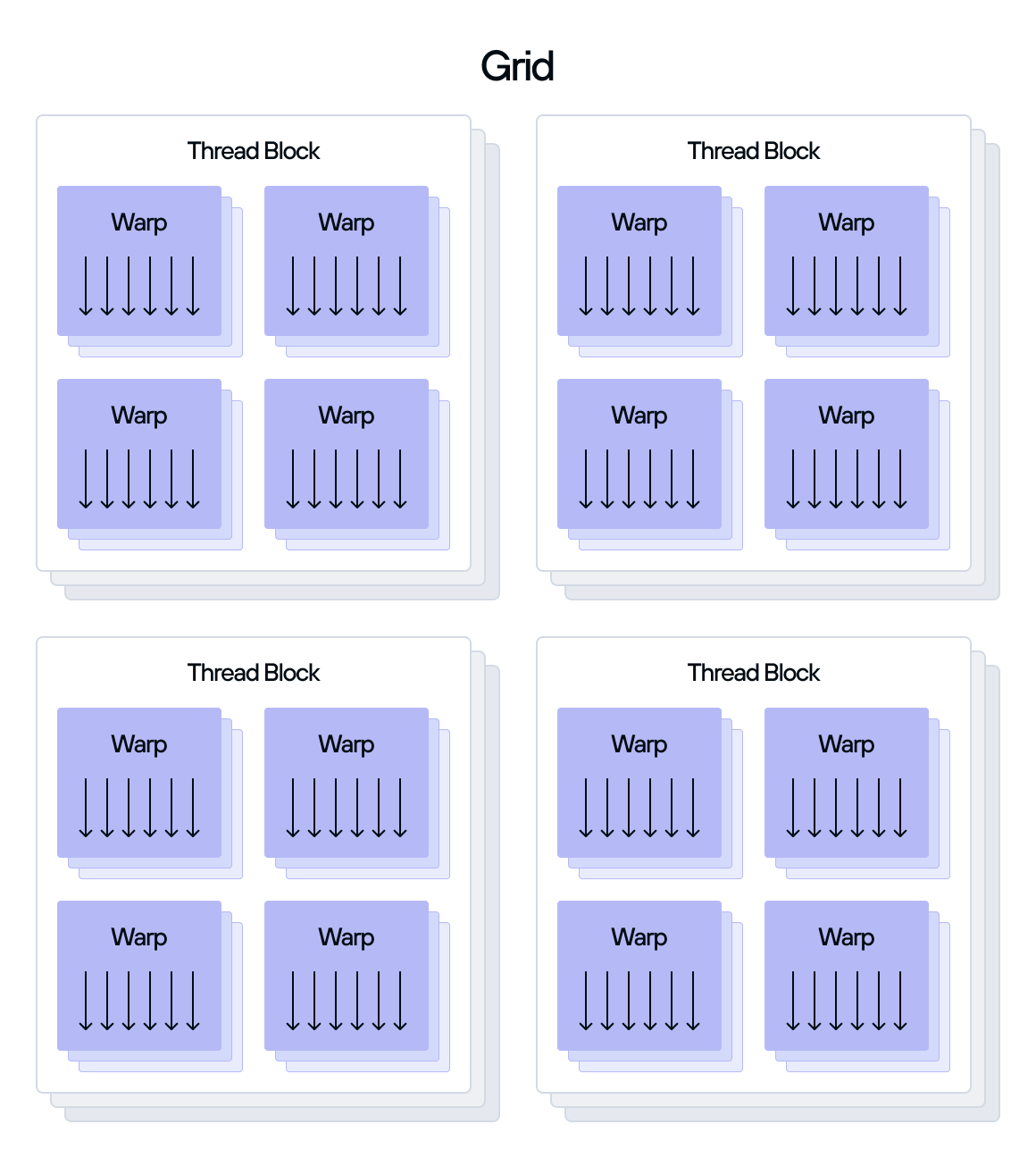
The division of a grid into thread blocks serves multiple purposes:
- It breaks down the overall workload—managed by the grid—into smaller, more manageable portions that can be processed independently. This division allows for better resource utilization and scheduling flexibility across multiple SMs in the GPU.
- Thread blocks provide a scope for threads to collaborate through shared memory and synchronization primitives, enabling efficient parallel algorithms and data sharing patterns.
Thread blocks help with scalability by allowing the same program to run efficiently across different GPU architectures, as the hardware can automatically distribute blocks based on available resources.
You must specify the number of thread blocks in a grid and how they are arranged across one, two, or three dimensions. Typically, you determine the dimensions of the grid based on the dimensionality of the data to process. For example, you might choose a 1-dimensional grid for processing large vectors, a 2-dimensional grid for processing matrices, and a 3-dimensional grid for processing the frames of a video. The GPU assigns each block within the grid a unique block index that determines its position within the grid.
Similarly, you also must specify the number of threads per thread block and how they are arranged across one, two, or three dimensions. The GPU also assigns each thread within a block a unique thread index that determines its position within the block. The combination of block index and thread index uniquely identify the position of a thread within the overall grid.
When a GPU assigns a thread block to execute on an SM, the SM divides the thread block into subsets of threads called a warp (or wavefront on AMD GPUs). The size of a warp depends on the GPU architecture, but most modern GPUs currently use a warp size of 32 or 64 threads.
If a thread block contains a number of threads not evenly divisible by the warp size, the SM creates a partially filled final warp that still consumes the full warp's resources. For example, if a thread block has 100 threads and the warp size is 32, the SM creates:
- 3 full warps of 32 threads each (96 threads total).
1 partial warp with only 4 active threads but still occupying a full warp's worth of resources (32 thread slots).
The SM effectively disables the unused thread slots in partial warps, but these slots still consume hardware resources. For this reason, you generally should make thread block sizes a multiple of the warp size to optimize resource usage.
Each thread in a warp executes the same instruction at the same time on different data, following the single instruction, multiple threads (SIMT) execution model. If threads within a warp take different execution paths (called warp divergence), the warp serially executes each branch path taken, disabling threads that are not on that path. This means that optimal performance is achieved when all threads in a warp follow the same execution path.
An SM can actively manage multiple warps from different thread blocks simultaneously, helping keep execution units busy. For example, the warp scheduler can quickly switch to another ready warp if the current warp's threads must wait for memory access.
Warps deliver several key performance advantages:
- The hardware needs to manage only warps instead of individual threads, reducing scheduling overhead.
- Threads in a warp can access contiguous memory locations efficiently through memory coalescing.
- The hardware automatically synchronizes threads within a warp, eliminating the need for explicit synchronization.
The warp scheduler can hide memory latency by switching between warps, maximizing compute resource utilization.
So far, we've explained some basic concepts about the GPU hardware and how the GPU executes parallel processes using threads, but without showing any code. To start programming a GPU with Mojo, you can either read GPU programming fundamentals for an overview of the Mojo programming model, or jump right into a project with the tutorial to Get started with GPU programming.
Adapted from the Mojo Manual and the MAX GPU programming guides, part of the Modular Platform repository (github.com/modular/modular), Copyright (c) Modular Inc., licensed under the Apache License v2.0 with LLVM Exceptions. Changes were made: reformatted as an accessible XYZ web edition with build-verified example outputs. Mojo and MAX are trademarks of Modular Inc.; this edition is not affiliated with or endorsed by Modular. License: Apache-2.0 WITH LLVM-exception.