
Appendix 1
Python Computer Installation
If you prefer not to use Google Colab Notebook, you can install free Python in your computer and use the Anaconda Jupyter Notebook. Go to this website and select Windows, MacOS or Linux, depending on your computer. When the installation is completed, open jupyter Notebook(anaconda3) from the Anaconda folder on your computer. You can also watch YouTube videos on how to install Anaconda for Windows 10 or MacOS.
Open Jupyter Notebook from your Windows computer Start menu under Anaconda and click new. You can add new code-cell or text-cell by clicking + and code (see pictures below). You can run a code-cell by clicking *run*.
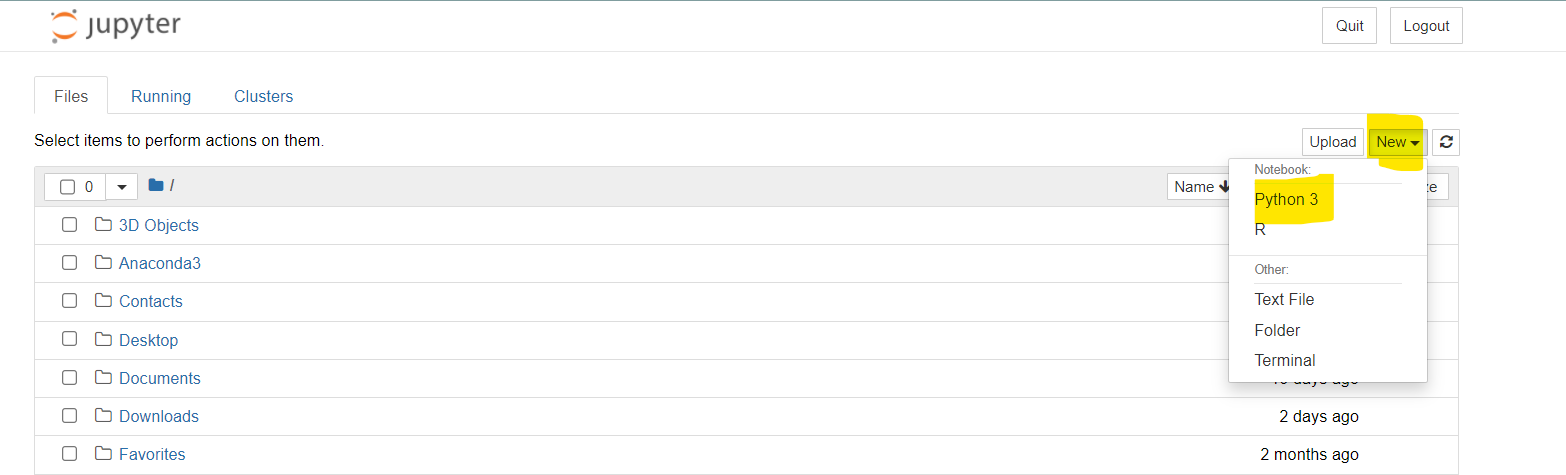
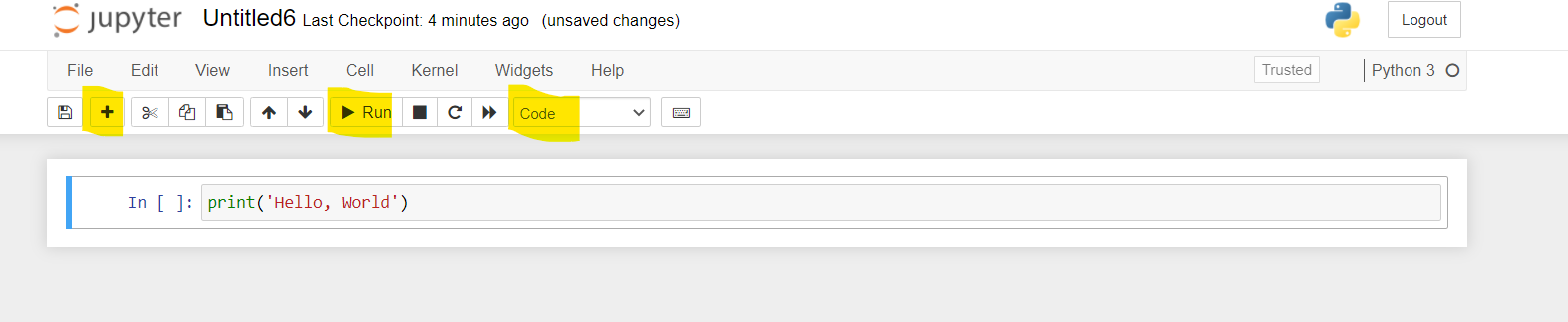
Adapted from Python for Introductory Statistics: Student's Lab Workbook, by Simon Aman (Truman College, City Colleges of Chicago), licensed under CC BY 4.0. Changes were made: reformatted as an accessible XYZ web edition with live in-browser code cells. License: CC-BY-4.0.