
4.1 The for Loop
The for loop can be used to iterate over a sequence such as a list or other iterable objects.
Syntax:
 for i in sequence_name:      # i will take each value of sequence_name
    block statements
For Loop Flowchart
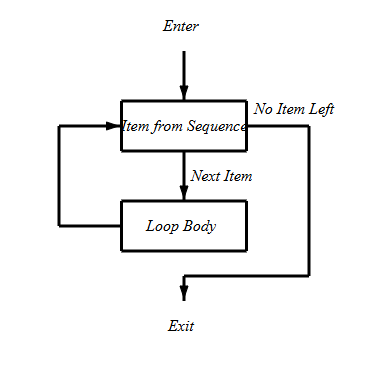
The flow of execution for a for statement:
- Take the first element in the list
- execute the block statement
- Go back to step 1
- Repeat step 1 to 3 until the last element of the list reached
Example: print the values of each element in the list x=[5, 10, 5, 4].
- Click
+ Codeto add a code-cell - Type
x = [5, 10, 5, 4] - Type
for v in x: - Type indented
print(v)
x = [5, 10, 5, 4]
for v in x:
	print(v)
Show expected output
5
10
5
4Note: When the program reaches the second line and encounters for, it uses v to store the first element in x. In the third line, it will print the current value of v. Then it will go back to the second line and use v to store the second element in x and prints this updated value of v. This pattern repeats till all elements in x are reached.
Example: Given a list of integers, use the for loop to add all values in a list. Same as sum(x) from list operators.
x = [5, 10, 5, 4]
sum1 = 0
for i in x:
	sum1 = sum1 + i
print("The sum is", sum1)
Show expected output
The sum is 24Note: In the above code, i is the variable that takes the value of the elements inside the x list on each iteration. The for loop continues until the last element in the list is reached. The body of for loop is separated from the rest of the code using indentation.
Note: The flow of execution:
Begin
x = [5, 10, 5, 4](line 1)sum1 = 0(line 2)
Enter for loop
i=x[0]=5(line 4)sum1 = sum1 + i = 0 + 5 = 5. (line 5)
Back to the for loop
i=x[1]=10(line 4)sum1 = sum1 + i = 5 + 10 = 15(line 5)
Back to the for loop
i=x[2]=5(line 4)sum1 = sum1 + i = 15 + 5 = 20(line 5)
Back to the for loop
i=x[3]=4(line 4)sum1 = sum1 + i = 20 + 4 = 24(line 5)
Back to the for loop i=x[4] no element left in the list
- Exit the
forloop
Go to line 6
print("The sum is", sum1).
This could also be done using the sum(x) list operator as follows:
x = [5,10,5,4]
sum(x)
Show expected output
24Example: Given a list of numbers, find its average. The average is the sum of all the numbers divided by size of the list.
x = [2.3,3.5,4,2.6,3.1,1.9]
sum1 = 0
for i in x:
  sum1 = sum1 + i
average = sum1/len(x)
print("the average is ", average)
Show expected output
the average is 2.9Note: The total sum1 is the same as the code above. After the for loop in line 4, average=sum1/len(x). len(x) is the size or number of elements in x.
Example: The ages of current (as of 2020) US Senators are given below. Write a Python program that displays the number of Senators who are older than 65 years.
81,81,80,80,80,80,78,78,78,77,77,75,75,74,74,74,73,72,72,71,71,71,71,70,70, 70,70,68,68,68,68,68,67,67,67,66,66,65,65,65,65,64,64,64,64,64,64,63, 63, 63,63,62,62,62,62,62,61,61,61,60,60,59,59,59,59,59,59,59,59,58,58,57, 57,56,56,55,54,54,54,54,54,53,53,52,52,52,52,52,51,50,49,48,46,45,44,43,43, 43,42,41
age = [81,81,80,80,80,80,78,78,78,77,77,75,75,74,74,74,73,72,72,71,71,71,71,70,
    70,70,70,68,68,68,68,68,67,67,67,66,66,65,65,65,65,64,64,64,64,64,64,63,63,
        63,63,62,62,62,62,62,61,61,61,60,60,59,59,59,59,59,59,59,59,58,58,57,57,
        56,56,55,54,54,54,54,54,53,53,52,52,52,52,52,51,50,49,48,46,45,44,43,43,
        43,42,41]

count = 0
for i in age:
  if i > 65:
    count = count + 1
print(count)
print('Of the',len(age),'Senators,', count,'are over 65 years old')
Show expected output
37
Of the 100 Senators, 37 are over 65 years oldNote: age and count are defined first. In the for statement i takes the first element of age and checks if it is greater than 65. If true count = 0 + 1 if not true, it will go back to the for statement and i takes the second element in age. The pattern continues till the last element in age.
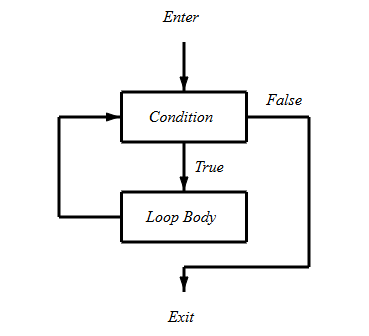
While Loop Flowchart
Syntax
while condition:
  block statements
The flow of execution for a while statement:
- Evaluate the condition, yielding True or False.
- If the condition is false, exit the while statement and continue execution at the next statement.
- If the condition is true, execute the body and then go back to step 1.
Example: Print the first 5 positive integers: 1, 2, 3, 4, and 5.
i = 0
while i < 5:
   i = i + 1
   print(i)
Show expected output
1
2
3
4
5Note: In the above code, the flow of execution is:
Begin in line 1
i = 0before the loop
Enter while loop
i = 0 < 5isTrue(line 2)i = i + 1 = 0 + 1 = 1(line 3)- print
i = 1(line 4)
Back to the while loop
i = 1 < 5isTrue, (line 2)i = i + 1 = 1 + 1 = 2(line 3)- print
i = 2(line 4)
Back to the while loop
i = 2 < 5isTrue(line 2)i = i + 1 = 2 + 1 = 3(line 3)- print
i = 3(line 4)
Back to the while loop
i = 3 < 5isTrue(line 2)i = i + 1 = 3 + 1 = 4(line 3)- print
i = 4(line 4)
Back to the while loop
i = 4 < 5isTrue(line 2)i = i + 1 = 4 + 1 = 5(line 3)-
print
i = 5(line 4)Back to the
whilestatement. i = 5 < 5isFalse
Exit the loop
Example: Find the sum of the first 5 positive integers.
i = 0
sum1 = 0
while i < 5:
   i = i + 1
   sum1 = sum1 + i

print("Total sum:",sum1)
Show expected output
Total sum: 15In the above code:
i = 0andsum1 = 0before the loop-
i = 0 < 5is true (1st loop)i = i + 1 = 0 + 1 = 1 and sum1 = sum1 + i = 0 + 1 = 1
i = 1 < 5is true (2nd loop) i = i + 1 = 1 + 1 = 2 and sum1 = sum1 + i = 1 + 2 = 3i = 2 < 5is true (2nd loop) i = i + 1 = 2 + 1 = 3 and sum1 = sum1 + i = 3 + 3 = 6i = 3 < 5is true (3rd loop) i = i + 1 = 3 + 1 = 4 and sum1 = sum1 + i = 6 + 4 = 10i = 4 < 5is true (4th loop) i = i + 1 = 4 + 1 = 5 and sum1 = sum1 + i = 10 + 5 = 15i = 5 < 5is false exit loop
print sum = 15 (last value of sum)
Note: Fibonacci Numbers: 1,1,2,3,5,8,13,21,34,55,89,144,... The first two are 1 and 1. The rest are found by adding the two preceding numbers. The list can continue indefinitely.
Example: Write a Python program that lists a user given number of Fibonacci numbers.
# n = input("How many Fibonacci numbers do you want to list? ")
n = "10"   # ← web edition: the value the book's own run typed in

n = int(n)  # convert the default string to integer

i = 0   # initial counter
a = 1   # first number is 1
b = 1   # second number is 1

if n <= 0:
  print("Enter a positive integer")
if n == 1:
  print(a)
else:
 while i < n:   # repeat action while i < n is true
  print(a)     # print the first number
  i = i + 1    # increase i by 1
  c = a + b    # add the previous two numbers and place it in c
  a = b        # update the last two numbers
  b = c        # update the last two numbers
Show expected output
How many Fibonacci numbers do you want to list?10
1
1
2
3
5
8
13
21
34
55Adapted from Python for Introductory Statistics, by Simon Aman (Truman College, City Colleges of Chicago), licensed under CC BY 4.0. Changes were made: reformatted as an accessible XYZ web edition with live in-browser code cells. License: CC-BY-4.0.