
3.1 if Statements
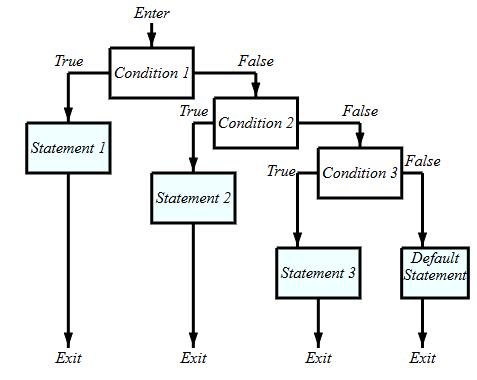
The if statement is used for decision making. If a specified condition is true, then a block of code is executed. If not true, the statement in the else if (elif) is checked and executed if true. If all are false, the process continues until the (else) statement.
Syntax
if condition1:        # this line ends with a colon :
   block statements   # this line(s) are indented
elif condition2:
   block statements
   ...
else:                 # no condition in this line
  block statements
Example: Given a number, for example 4, decide if it is positive or negative.
- Click
+ Codeto add a code-cell - Type
a = 4 - Type
if a > 0: - Type
print(' a is positive) - Type
else: - Type
a is negative or zero - Click
playbutton
a = 4
if a > 0:
  print('a is positive')
else:
  print('a is negative or zero')
Show expected output
a is positiveNote: The if condition a > 0 is either true or false. If true, the statement below the if condition is executed. If false the program goes to the else statement. In this case a=4 > 0 is true and the statement print('a is positive) is executed.
Python Comparison (Logical) Operators
A Boolean expression is an expression that is either true or false. The operator == compares two operands and produces True if they are equal and False otherwise.
| Name | Operator | Example | Result |
|---|---|---|---|
| Greater than |
>
|
5>6
|
False
|
| Greater than or Equal to |
>=
|
5>=4
|
True
|
| Less than | < |
5<4
|
False
|
| Less than or equal to |
<=
|
5<=5
|
True
|
| Equal |
==
|
5==6
|
False
|
| Not Equal |
!=
|
5!=6
|
True
|
Example: Change the number 4 to -4 in the above example. What is the result. See code below.
a = -4
if a > 0:
  print('a is positive')
else:
  print('a is negative or zero')
Show expected output
a is negative or zeroExample: Given the numbers 2 and 3, decide if 2 is less than 3, greater than 3 or equal to 3.
a = 2
b = 3
if a < b:                        # if statement ends with colon :
  print("2 is less than 3")      # block statement indented
elif a > b:
  print("2 is greater than 3")
else:
  print("2 is equal to 3")
Show expected output
a is less than bExample: Use input() function to ask the user for two integers and use these numbers in the if statement to decide if the first number is less, greater, or equal to the second number. This time we need to convert the string variable to decimal using the float() function.
# x = input("Enter first number :")
x = "6"   # ← web edition: the value the book's own run typed in
# y = input("Enter second number :")
y = "10"   # ← web edition: the value the book's own run typed in

x = float(x)    # converts (casts) the default string value to an integer value
y = float(y)

if x < y:
  print("The first number is less than the second!")
elif x > y:
  print("The first number is greater than the second!")
else:
  print("They are equal!")
Show expected output
Enter first number :6
Enter second number :10
The first number is less than the second!
If Statement Flowchart
Example: The slope-intercept equation of a line with slope and -intercept is given as . if is positive, is increasing, if it is negative is decreasing and if it is zero is a constant. Write a program with slope m and use the if statement to decide if the line is increasing, decreasing or constant.
m=3                       # the slope is selected to be 3

if m>0:
  print ("increasing")
elif m<0:
  print("decreasing")
else:
  print("constant")
Show expected output
increasingExample: Write a Python program that asks a user to enter two numbers. Compute and display the sum of the two numbers. If the sum is greater than 10, compute and display the product of the two numbers. If the sum is less than 10 compute and display the product of the two numbers plus 5. Otherwise display the text 'the sum is 10'.
# x = input('enter the first number:')
x = "5"   # ← web edition: the value the book's own run typed in
# y = input('enter the second number:')
y = "6"   # ← web edition: the value the book's own run typed in

x = float(x)
y = float(y)

sum1 = x + y        # 'sum' is a resrved key word in Python
print('the sum is',sum1)

if sum1 > 10:
  print('the product is',x*y)
elif sum1 < 10:
  print('the product plus 5 is',x*y+5)
Show expected output
enter the first number:5
enter the second number:6
the sum is 11.0
the product is 30.0
You can also use the built-in Python input function to read and return a line of string(text). Every time you run the code below, you will be asked to enter the slope of your choice. The function int returns (converts) the value to an integer, whenever possible. Reference to built-in Python functions
# m=input("enter any integer number (your choice) for the slope m = ")
m = "-9"   # ← web edition: the value the book's own run typed in
m = int(m)     # cast the input as integer

if m>0:                  # check if m>0
  print ("increasing")
elif m<0:                # check if m<0 if the if was False
  print("decreasing")
else:
  print("constant")
Show expected output
enter any integer number (your choice) for the slope m = -9
decreasingAdapted from Python for Introductory Statistics, by Simon Aman (Truman College, City Colleges of Chicago), licensed under CC BY 4.0. Changes were made: reformatted as an accessible XYZ web edition with live in-browser code cells. License: CC-BY-4.0.